
Invite your team
The business's owner and admins can invite people to work on it, each with a role that decides what they can do. Invitations go by email, and the link works once, for that email address.
Before you start
You need to be the business's owner or an admin. How many people your plan includes, counted once across all your businesses: Free just you (inviting asks you to choose a paid plan), TaxAudit Starter you + 1, TaxAudit Business you + 3. TaxAuditPro has no limit on staff.
Steps
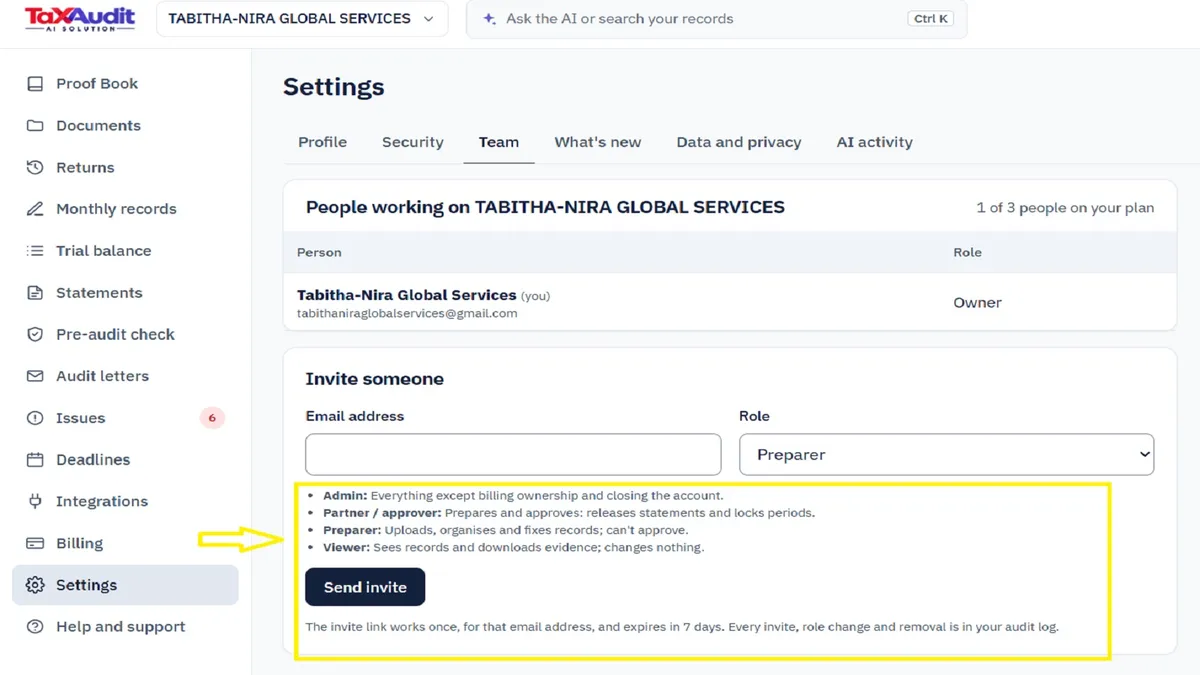
Go to Settings → Team.
Under Invite someone, enter their email address and choose a role: - Admin: everything except billing ownership and closing the account (only the owner can invite an admin). - Partner / approver: prepares and approves: releases statements and locks periods. - Preparer: uploads, organises and fixes records; can't approve. - Viewer: sees records and downloads evidence; changes nothing. An accountant's invited client (TaxAuditPro) sees their Proof Book, documents, monthly records, trial balance, filing history, deadlines and released statements, and can upload receipts and documents.
On TaxAuditPro, tick the clients they'll work on under Clients they'll work on. They see only those clients, from the moment they join. An admin sees every client, so there's nothing to tick for them.
Choose Send invite. They get an email from TaxAudit with Accept the invitation (on TaxAuditPro, the link opens pro.taxaudit.ng).
They accept by signing in, or creating an account, with that email address. We email you (the owner) and whoever sent the invitation when they join.
Common questions
The invitation expired or got lost.
Under Pending invitations, choose Resend. A new link is sent and the old one stops working. Links last 7 days.
How do I change someone's role or remove them?
In the team list, choose a new role and Change, or choose Remove. Removing someone ends their access at once; the work they did stays in the business's history.
Can I remove the owner?
No. The owner can't be removed or changed here.
What does each role see and do?
Each role sees only what it may use: buttons for things a role can't do (approving a month, uploading, deleting, changing the team) don't appear for it. Billing (in the side menu) is for the owner and admins; AI activity isn't shown to viewers, and preparers see their own.
On TaxAuditPro, who sees which clients?
Owners and admins see every client. Everyone else, viewers included, sees the clients assigned to them: until then, only Clients, Settings and Help and support. See Assign staff to clients.