
Accept updated Terms
When we make an important change to the Terms of Service or the Privacy Policy, we tell you what changed and ask you to accept the new version the next time you open TaxAudit. Small changes, such as correcting a typing mistake, don't need your acceptance.
Steps
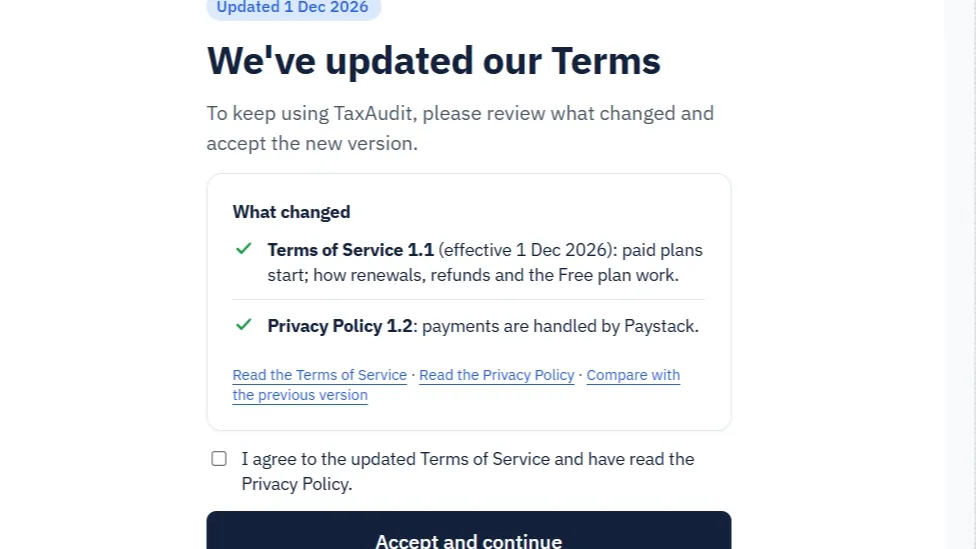
Open TaxAudit. If there's an important change, you'll see We've updated our Terms first.
Read What changed. Each updated document is listed with its new version and a short summary, with links to read it in full.
Tick I agree and choose Accept and continue. You go straight back to where you were.
When you sign up, you accept the current Terms and Privacy Policy by ticking the box on the sign-up form. Accounts created before we started recording this are asked once, the same way.
Common questions
What if I don't agree?
Choose Sign out. You can still ask for a copy of your data from Request your data (taxaudit.ng/data-request/), or contact us.
Can I still change my password or two-step verification before accepting?
Yes. Your account and security settings stay open.
Is my acceptance recorded?
Yes: which version you accepted and when, so we can show what applied to your account.