
Change your email address
You can move your account to a new email address. We confirm it's you first, then confirm the new address works.
Steps
Go to taxaudit.ng/app/email/ and confirm it's you with the emailed security code.
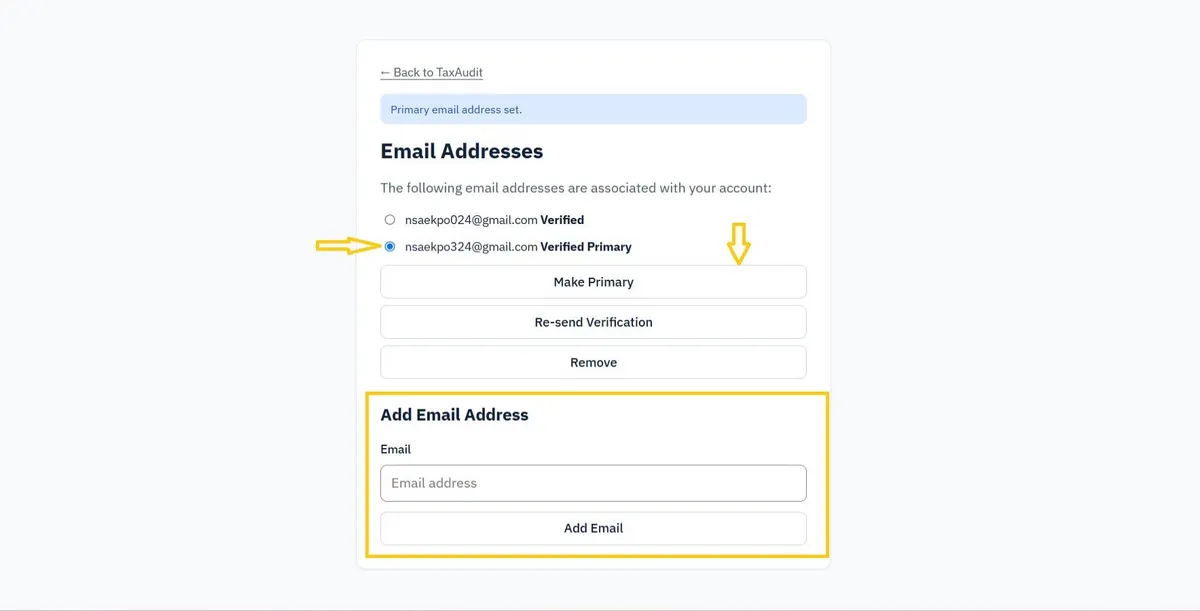
Under Add email Address, enter the new address and choose Add Email.
Confirm the new address with the code we send to it.
The new email address is automatically listed. Next, you choose the new email by clicking on the selection button.
Click on Make Primary to change to the new email.
Watch for our email about the change. If you didn't make it, write to security@taxaudit.ng straight away.
Was this article helpful?
Still stuck? Our support team can help.
Contact support