
Policy versions and downloading a policy
Every TaxAudit policy, from the Terms of Service to the Cookie Policy, shows which version you're reading and when it applies from. Each version is kept, so you can always see exactly what you agreed to.
Steps
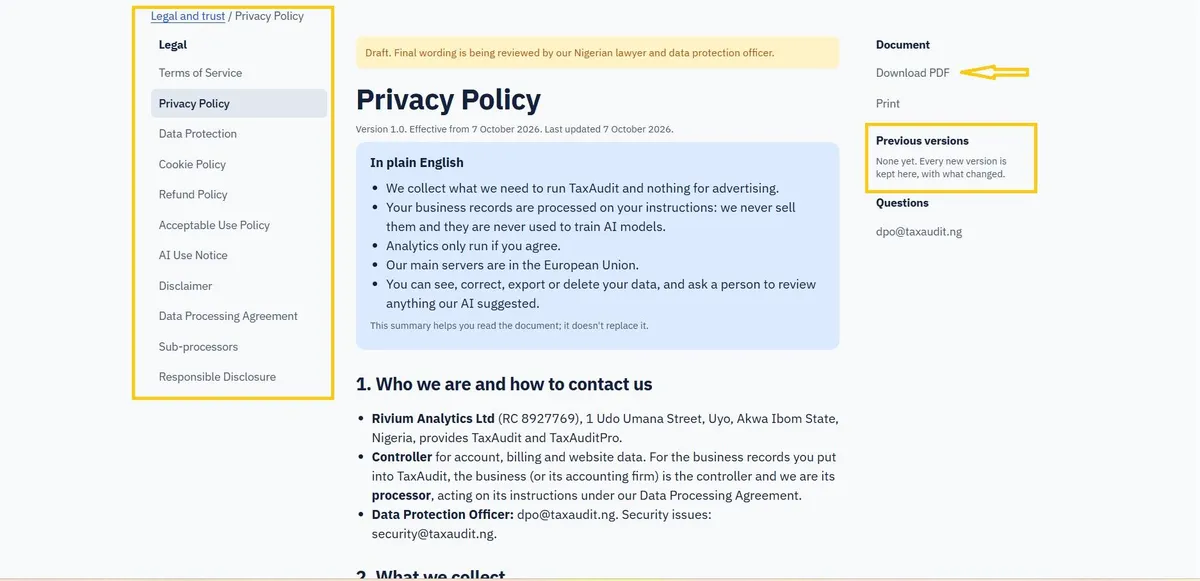
Open a policy from Legal and trust (taxaudit.ng/legal/). On Legal and trust, each policy's card already shows its current version and the date it applies from, for example "v1.0, effective 7 Oct 2026".
Check the line under the title: for example "Version 1.0. Effective from 7 October 2026."
Read the In plain English box for a quick summary. It helps you read the policy; it doesn't replace it.
Choose Download PDF to keep a copy, or Print.
See an earlier version under Previous versions. Each one says what changed and has its own PDF.
Common questions
Why does it say "Draft"?
Our policies are being reviewed by our Nigerian lawyer and data protection officer. The notice disappears once they've approved the final wording.
Who do I ask about a policy?
The address under Questions on each policy: legal@taxaudit.ng, or dpo@taxaudit.ng for privacy and data protection.